How to Find Missing Comic Issues in Your Collection
You are sure you own the whole run, then a gap shows up the day you sit down to read it. drofcomics finds the holes in every series for you. Here is how to track down your missing issues, step by step.
Step 1: Give each comic a series and an issue number
Series tracking works from two fields: the series name and the issue number. Scan a cover or a barcode and both are usually filled in for you, or type them in when you add a comic by hand. Importing a CSV file? Match your columns to the series and issue number fields.
Comics without a series stay in your collection, but they don't appear in Series view, since a single issue isn't a run.
Step 2: Open Series view
Go to My Comics and switch to the Series tab. Every run you collect gets its own card, sorted from A to Z, with a search box at the top so you can jump straight to a title.
Step 3: Read the series grid
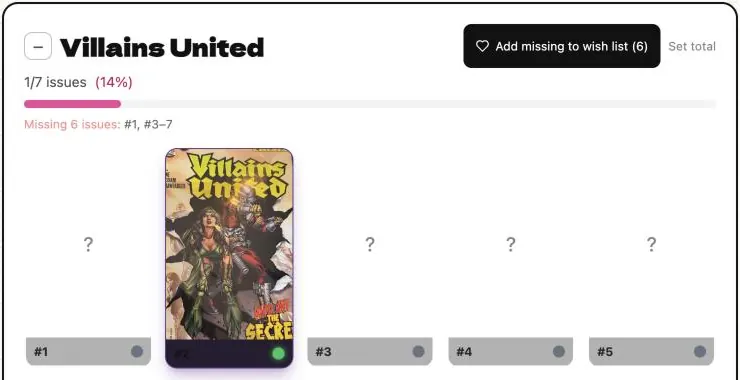
Each card shows how many issues you own out of the full run, your completion percentage and a progress bar. Below it is a grid with one slot per issue. Owned issues show their cover and a green dot. Missing issues show an empty slot with a question mark and a gray dot.
Under the progress bar, a short line lists every missing number, grouped into ranges so even a long gap stays easy to read. Tap the minus button next to a series name to fold its grid away.
Step 4: Check the total for the run
drofcomics matches each series against a comics catalog to learn how many issues the run really has. If a series isn't in the catalog, the total falls back to the highest issue number you own.
Collecting a limited series, or a volume that ended early? Tap Set total, type the real number of issues and the grid and percentage update right away.
Step 5: Send the gaps to My List
When a series is found in the catalog, tap Add missing to My List. The button shows how many issues it will add, and issues already on My List are skipped, so you can tap it again after every haul.
Step 6: Compare your run in Series Hub
Series Hub, under Discover, shows series from collectors across the site. For each run you see the issues the community has logged, how many collectors follow it and your own completion, with your missing issues listed by number.
Sort by Most Collectors or Most Issues to find popular runs, or search for a title to see how your shelf compares.
Start finding your gaps
drofcomics is free, with no ads and no premium tier. Create an account, add or import your comics, and open Series view to see what is missing.
New here? See everything the free comic collection tracker can do.